> ## Documentation Index
> Fetch the complete documentation index at: https://pulze.ai/docs/llms.txt
> Use this file to discover all available pages before exploring further.
# Custom Routers
> Build intelligent AI model routers from your evaluation data
## Overview
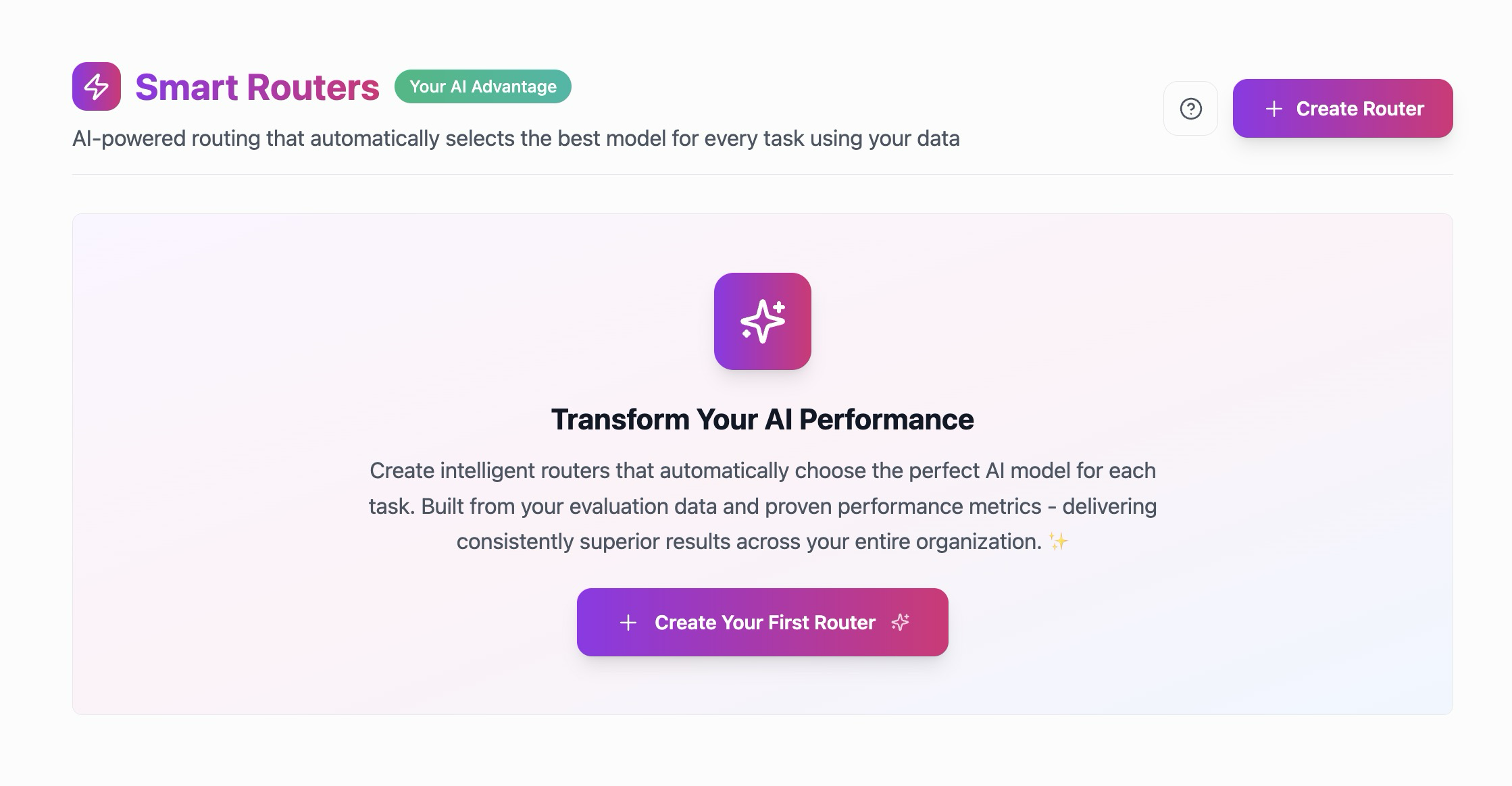
Custom Routers in Pulze enable you to create intelligent, **Mixture of Experts (MoE) routing systems** that automatically select the best AI model for every request. Unlike static model selection, custom routers learn from your evaluation data to make smart routing decisions based on your unique use cases and proprietary data.
 ## What Are Custom Routers?
Custom routers are AI-powered routing systems that:
* **Analyze each request** to understand its requirements and complexity
* **Select the optimal model** from your model pool based on learned patterns
* **Learn from your evaluations** to continuously improve selection accuracy
* **Optimize for your goals** - whether that's quality, cost, speed, or a balance
* **Adapt to your domain** using your proprietary datasets and benchmarks
Think of a custom router as your personal AI model expert that knows exactly which model performs best for each type of task in your specific domain.
## The Power of Evaluation-Driven Routing
Custom routers are built on a foundation of systematic testing and evaluation. Here's how the complete workflow creates intelligent routing:
### The Complete Workflow
```
1. Create Datasets → 2. Design Evaluation Templates → 3. Run Evaluations → 4. Build Custom Router
```
#### 1. Create Your Datasets
Start by building [**datasets**](/pulze/data/datasets) that represent your real-world use cases:
* **Manual Datasets**: Curate specific test cases for your domain
* **Learning Datasets**: Extract successful interactions from your spaces
* **Benchmark Datasets**: Leverage open-source benchmarks from the [Pulze Evals repository](https://github.com/pulzeai-oss/evals)
Your datasets become the foundation for understanding which models excel at which tasks in your specific context.
Learn how to build comprehensive datasets for testing and evaluation
#### 2. Design Evaluation Templates
Create [**evaluation templates**](/pulze/data/evaluations) that define your quality standards:
* Define metrics that matter to your use case (accuracy, helpfulness, tone, etc.)
* Configure evaluation criteria using "LLM-as-a-judge" methodology
* Set quality thresholds for passing evaluations
* Test different configurations and feature flags
Evaluation templates ensure consistent, objective assessment of model performance.
Learn how to create evaluation templates that define your quality standards
#### 3. Run Comprehensive Evaluations
Execute [**evaluation runs**](/pulze/data/evaluations) to gather performance data:
* Test multiple AI models against your datasets
* Evaluate entire space configurations with assistants and tools
* Compare models across different task types and complexity levels
* Generate detailed performance metrics and scores
These evaluation results reveal which models perform best for which types of queries in your domain.
#### 4. Build Your Custom Router
## What Are Custom Routers?
Custom routers are AI-powered routing systems that:
* **Analyze each request** to understand its requirements and complexity
* **Select the optimal model** from your model pool based on learned patterns
* **Learn from your evaluations** to continuously improve selection accuracy
* **Optimize for your goals** - whether that's quality, cost, speed, or a balance
* **Adapt to your domain** using your proprietary datasets and benchmarks
Think of a custom router as your personal AI model expert that knows exactly which model performs best for each type of task in your specific domain.
## The Power of Evaluation-Driven Routing
Custom routers are built on a foundation of systematic testing and evaluation. Here's how the complete workflow creates intelligent routing:
### The Complete Workflow
```
1. Create Datasets → 2. Design Evaluation Templates → 3. Run Evaluations → 4. Build Custom Router
```
#### 1. Create Your Datasets
Start by building [**datasets**](/pulze/data/datasets) that represent your real-world use cases:
* **Manual Datasets**: Curate specific test cases for your domain
* **Learning Datasets**: Extract successful interactions from your spaces
* **Benchmark Datasets**: Leverage open-source benchmarks from the [Pulze Evals repository](https://github.com/pulzeai-oss/evals)
Your datasets become the foundation for understanding which models excel at which tasks in your specific context.
Learn how to build comprehensive datasets for testing and evaluation
#### 2. Design Evaluation Templates
Create [**evaluation templates**](/pulze/data/evaluations) that define your quality standards:
* Define metrics that matter to your use case (accuracy, helpfulness, tone, etc.)
* Configure evaluation criteria using "LLM-as-a-judge" methodology
* Set quality thresholds for passing evaluations
* Test different configurations and feature flags
Evaluation templates ensure consistent, objective assessment of model performance.
Learn how to create evaluation templates that define your quality standards
#### 3. Run Comprehensive Evaluations
Execute [**evaluation runs**](/pulze/data/evaluations) to gather performance data:
* Test multiple AI models against your datasets
* Evaluate entire space configurations with assistants and tools
* Compare models across different task types and complexity levels
* Generate detailed performance metrics and scores
These evaluation results reveal which models perform best for which types of queries in your domain.
#### 4. Build Your Custom Router
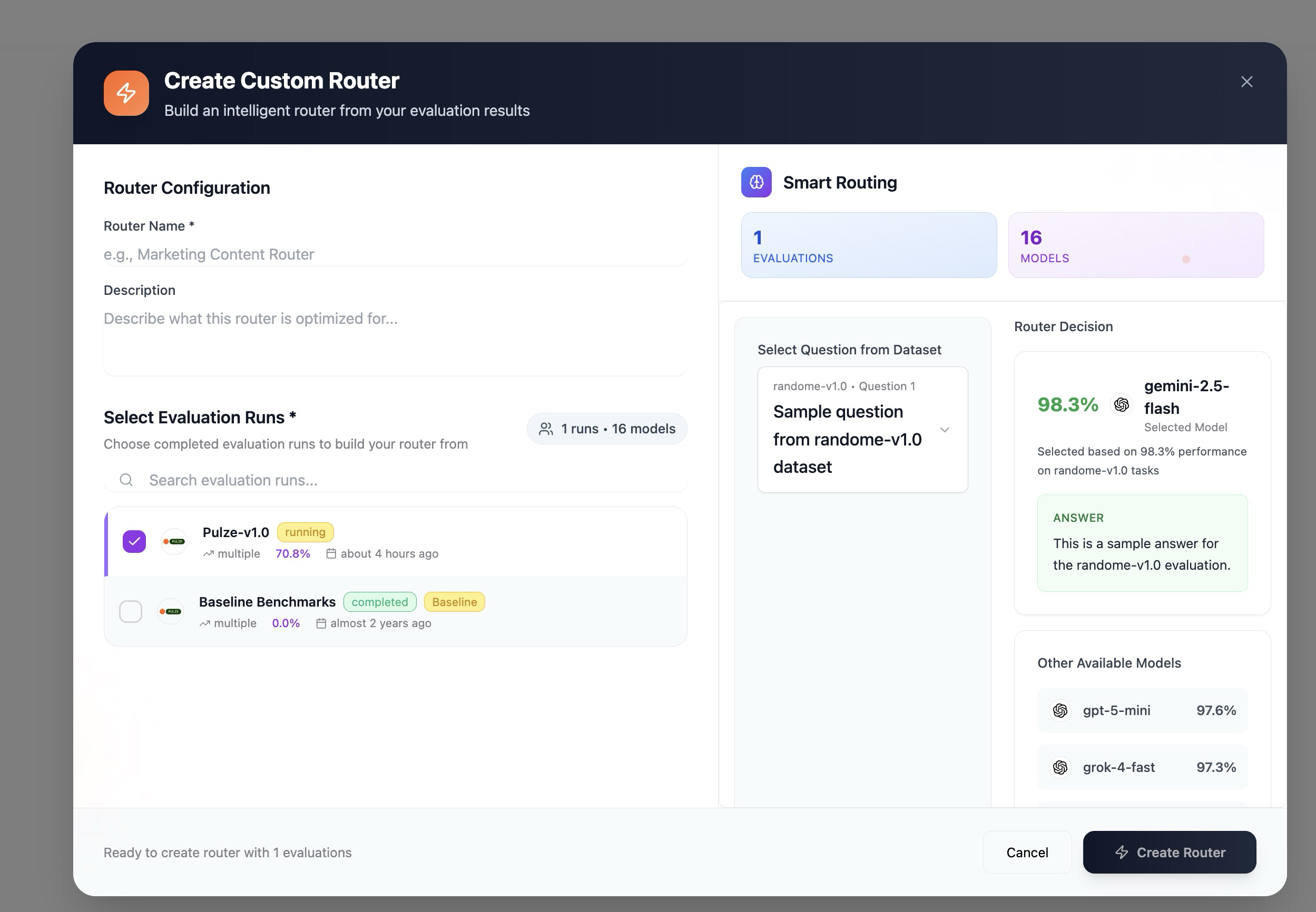 Transform your evaluation insights into an intelligent router:
1. **Select Evaluation Runs**: Choose evaluations that represent your target use cases
2. **Configure Router Logic**: Define how the router should select models based on learned patterns
3. **Train the Router**: The system builds a [**KNN (K-Nearest Neighbors) router**](/community/knn-router) using your evaluation data
4. **Deploy and Use**: Activate your router for specific spaces, agents, teams, or your entire organization
The router learns from your evaluation patterns, understanding which models excel at different query types, complexity levels, and domain-specific requirements.
Learn about the open-source KNN router technology that powers custom routing
## Your AI Competitive Advantage
Custom routers provide unique defensibility for your AI systems:
### Proprietary Intelligence
By creating datasets and running evaluations on your specific use cases, you build:
* **Domain-specific routing** tailored to your industry and tasks
* **Proprietary performance data** that reflects your unique requirements
* **Fine-tuned selection logic** that understands your quality standards
* **Private evaluation results** that remain within your organization
This proprietary intelligence becomes your competitive advantage—a routing system that knows your business better than any generic router could.
### Public and Private Options
Pulze supports both open and private evaluation strategies:
**Public Contributions:**
* Use open-source benchmarks from the [Pulze Evals repository](https://github.com/pulzeai-oss/evals)
* Contribute your own benchmarks back to the community
* Leverage community-curated evaluation templates
* Benefit from collaborative benchmark development
**Private Evaluations (Enterprise):**
* Keep your datasets, evaluations, and routing logic completely private
* Build defensible AI systems on proprietary data
* Maintain competitive advantages through private benchmarks
* Ensure sensitive data never leaves your organization
Many enterprises choose to keep their evaluation datasets private, using them to build custom routers that provide unique competitive advantages. Your proprietary data creates routing intelligence that competitors cannot replicate.
## Mixture of Experts (MoE) Routing
Custom routers implement a **Mixture of Experts** approach to model selection:
### How MoE Routing Works
Instead of using a single model for all tasks, your router maintains a pool of specialized models:
* **Different models for different tasks**: Route simple queries to fast, cost-effective models and complex reasoning to powerful models
* **Context-aware selection**: Consider query complexity, domain, and requirements when selecting models
* **Performance-based optimization**: Learn from evaluation data which model is the "expert" for each task type
* **Dynamic adaptation**: Continuously improve routing decisions based on outcomes
### The KNN Router Engine
Custom routers use [**K-Nearest Neighbors (KNN)**](/community/knn-router) technology to make intelligent routing decisions:
1. **Semantic Understanding**: Analyze incoming queries to understand their intent and requirements
2. **Similarity Matching**: Find semantically similar queries from your evaluation dataset
3. **Expert Selection**: Identify which models performed best on similar queries
4. **Weighted Scoring**: Select the optimal model based on learned performance patterns
This approach ensures your router benefits from every evaluation you run, continuously improving its ability to select the right model for each unique request.
## Accessing Router Management
Navigate to **Permissions → Routers** from the main menu to view, create, and manage all your organization's custom routers.
## Creating Custom Routers
### Prerequisites
Before creating a custom router, you need:
1. **Completed evaluation runs** with performance data
2. **Multiple models tested** to provide routing options
3. **Representative datasets** covering your use cases
4. **Quality thresholds defined** in your evaluation templates
Start by running evaluations on at least 3-5 different models across diverse datasets. This gives your router enough performance data to make intelligent routing decisions.
### Step-by-Step Router Creation
1. Click **"Create Router"** button in the Routers section
2. **Select Evaluation Runs**: Choose completed evaluation runs that represent your target performance
3. **Configure Router Settings**:
* **Name**: Descriptive identifier (e.g., "Customer Support MoE Router")
* **Description**: Explain the router's purpose and use cases
* **Model Pool**: The router automatically includes models from selected evaluations
* **Routing Strategy**: The system configures KNN-based routing from evaluation patterns
4. **Review Configuration**: Verify the router's training data and model pool
5. **Create and Activate**: Save your router and make it available for use
### Router Configuration Details
When building a router from evaluations, the system:
* **Analyzes performance patterns** across all selected evaluation runs
* **Identifies query-model relationships** that indicate which models excel at which tasks
* **Builds a semantic understanding** of query types and complexity levels
* **Configures KNN routing logic** to replicate successful model selections
* **Sets up fallback strategies** for edge cases and error handling
## Using Custom Routers
### In Spaces
Assign routers to spaces for automatic intelligent routing:
1. Navigate to Space Settings
2. Go to **Models & Routers** section
3. Select your custom router
4. Save configuration
5. All new conversations in the space use intelligent routing
Learn how to configure routers for your spaces
### In API Calls
Reference routers programmatically:
```bash theme={null}
curl https://api.pulze.ai/v1/chat/completions \
-H "Authorization: Bearer YOUR_API_KEY" \
-H "Content-Type: application/json" \
-d '{
"router": "your-custom-router-name",
"messages": [{"role": "user", "content": "Hello!"}]
}'
```
### Scope Options
Custom routers can be deployed at different levels:
* **Specific Agents/Assistants**: Route intelligently for specialized AI agents
* **Individual Spaces**: Apply custom routing to specific teams or projects
* **Team-Level**: Provide consistent routing across team workspaces
* **Organization-Wide**: Deploy your router across your entire organization
This flexibility allows you to test routers in limited contexts before broader rollout.
### Continuous Improvement
Your router improves as you:
1. **Run more evaluations** on new datasets and scenarios
2. **Update router training data** with recent evaluation results
3. **Add new models** to the pool and evaluate their performance
4. **Refine quality standards** through updated evaluation templates
5. **Analyze routing patterns** and adjust strategies
Re-train your routers quarterly or after significant evaluation updates to ensure they benefit from your latest performance insights.
## Managing Routers
### Editing Routers
To modify a router:
1. Click the menu icon (⋮) on the router
2. Select **"Edit"**
3. Update evaluation runs or configuration
4. Re-train with new data if needed
5. Save and test updated router
### Activating/Deactivating
Control router availability:
* **Activate**: Make router available for spaces and API calls
* **Deactivate**: Temporarily disable without deleting training data
* **Archive**: Preserve router configuration but remove from active use
### Deleting Routers
Deleting a router is permanent. Spaces using this router will fall back to their default model configuration.
To remove a router:
1. Click the menu icon (⋮)
2. Select **"Delete"**
3. Confirm deletion
4. Router and its configuration are permanently removed
## Benefits of Evaluation-Driven Routing
**Proprietary Intelligence**: Build routing systems based on your unique data and use cases
**Latency Optimization**: Automatically select fastest models without sacrificing quality
**Quality Assurance**: Route queries to models that perform best for your specific requirements
**Continuous Learning**: Improve routing decisions as you run more evaluations
**Competitive Advantage**: Create defensible AI systems using private evaluation data
**Scalable Testing**: Build comprehensive benchmarks for your domain
## Open Source and Community
### Pulze Evals Repository
Pulze maintains an open-source repository of evaluation resources:
* **Datasets**: Curated benchmarks for testing AI performance
* **Evaluation Templates**: Community-contributed evaluation criteria
* **Benchmark Results**: Shared performance data across models
* **KNN Router**: Open-source routing technology
Explore open-source evaluation resources and contribute your own
### Contributing Back
Share your evaluation work with the community:
1. **Export your datasets** as public benchmarks
2. **Contribute evaluation templates** that others can use
3. **Share performance insights** (without sensitive data)
4. **Improve routing technology** through open-source collaboration
Your contributions help establish evaluation standards while you maintain private competitive advantages through proprietary data.
## Enterprise Use Cases
### Private Evaluation Pipelines
Enterprises use custom routers to:
* **Maintain data privacy** by keeping all evaluation data internal
* **Build defensible AI** that competitors cannot replicate
* **Optimize speed** across thousands or millions of requests
* **Ensure compliance** by controlling model selection based on data sensitivity
* **Improve productivity** through AI that understands domain-specific tasks
### Industry-Specific Routing
Create routers optimized for:
* **Legal**: Route complex legal reasoning to specialized models
* **Healthcare**: Ensure medical queries use compliant, accurate models
* **Finance**: Balance speed and accuracy for financial analysis
* **Customer Support**: Optimize for helpfulness and response speed
* **Software Development**: Route coding tasks to programming-specialized models
## Best Practices
**Start with Evaluation**: Always run comprehensive evaluations before building a custom router. Your router is only as intelligent as the evaluation data it learns from.
**Diverse Training Data**: Use multiple datasets and evaluation runs to ensure your router handles diverse query types effectively.
**Regular Updates**: Re-train your routers as you gather more evaluation data and add new models to your pool.
**Monitor Performance**: Track routing decisions and quality metrics to ensure your router continues to perform optimally.
**Test Before Deploying**: Start with a single space or team before rolling out routers organization-wide.
## Permission Requirements
Creating and managing routers requires **Editor** or **Admin** permissions for routers.
Access control for routers:
* **View**: See router list and details
* **Create**: Build new routers from evaluation data
* **Edit**: Modify router configuration and training data
* **Delete**: Remove routers
* **Assign**: Set routers as space or organization defaults
## Advanced Router Features
### A/B Testing
Compare router configurations:
1. Create two routers with different evaluation training sets
2. Deploy both to similar spaces
3. Compare performance metrics
4. Select the better-performing router
### Multi-Router Strategies
Use different routers for different purposes:
* **Domain-specific routers** for specialized teams
* **Cost-optimized routers** for high-volume use cases
* **Quality-focused routers** for critical applications
* **General-purpose routers** for diverse tasks
### Failover and Reliability
Custom routers include:
* **Automatic fallback** to reliable models on errors
* **Confidence scoring** to detect uncertain routing decisions
* **Error handling** to ensure robust performance
* **Rate limiting awareness** to avoid model capacity issues
## Troubleshooting
### Router Not Selectable
If a router isn't available:
1. Verify router status is **Active**
2. Check you have permissions to use the router
3. Confirm evaluation runs are valid and complete
4. Ensure router training completed successfully
### Unexpected Model Selection
If routing seems incorrect:
1. Review the evaluation data the router learned from
2. Check if new query types differ from training examples
3. Verify model pool includes appropriate options
4. Consider re-training with more representative evaluations
### Performance Issues
If routing performance degrades:
1. Analyze recent routing decisions and outcomes
2. Run new evaluations on current query patterns
3. Update router training with recent evaluation data
4. Review model availability and performance
5. Check for changes in query distribution
## Integration Workflow Summary
Here's the complete workflow for building intelligent routing:
1. **[Create Datasets](/pulze/data/datasets)**: Build evaluation datasets from your use cases
2. **[Design Templates](/pulze/data/evaluations)**: Define evaluation criteria and quality standards
3. **[Run Evaluations](/pulze/data/evaluations)**: Test models across your datasets
4. **Analyze Results**: Understand which models perform best for which tasks
5. **Build Router**: Create a custom router from evaluation insights
6. **Deploy and Monitor**: Use the router and track its performance
7. **Iterate**: Run more evaluations and improve your router over time
This systematic approach ensures your routing decisions are based on empirical evidence rather than guesswork.
## Related Resources
Create datasets for evaluation and router training
Run comprehensive model evaluations
Learn about KNN routing technology
Open-source evaluation resources
Configure routers in your spaces
Manage router permissions
Transform your evaluation insights into an intelligent router:
1. **Select Evaluation Runs**: Choose evaluations that represent your target use cases
2. **Configure Router Logic**: Define how the router should select models based on learned patterns
3. **Train the Router**: The system builds a [**KNN (K-Nearest Neighbors) router**](/community/knn-router) using your evaluation data
4. **Deploy and Use**: Activate your router for specific spaces, agents, teams, or your entire organization
The router learns from your evaluation patterns, understanding which models excel at different query types, complexity levels, and domain-specific requirements.
Learn about the open-source KNN router technology that powers custom routing
## Your AI Competitive Advantage
Custom routers provide unique defensibility for your AI systems:
### Proprietary Intelligence
By creating datasets and running evaluations on your specific use cases, you build:
* **Domain-specific routing** tailored to your industry and tasks
* **Proprietary performance data** that reflects your unique requirements
* **Fine-tuned selection logic** that understands your quality standards
* **Private evaluation results** that remain within your organization
This proprietary intelligence becomes your competitive advantage—a routing system that knows your business better than any generic router could.
### Public and Private Options
Pulze supports both open and private evaluation strategies:
**Public Contributions:**
* Use open-source benchmarks from the [Pulze Evals repository](https://github.com/pulzeai-oss/evals)
* Contribute your own benchmarks back to the community
* Leverage community-curated evaluation templates
* Benefit from collaborative benchmark development
**Private Evaluations (Enterprise):**
* Keep your datasets, evaluations, and routing logic completely private
* Build defensible AI systems on proprietary data
* Maintain competitive advantages through private benchmarks
* Ensure sensitive data never leaves your organization
Many enterprises choose to keep their evaluation datasets private, using them to build custom routers that provide unique competitive advantages. Your proprietary data creates routing intelligence that competitors cannot replicate.
## Mixture of Experts (MoE) Routing
Custom routers implement a **Mixture of Experts** approach to model selection:
### How MoE Routing Works
Instead of using a single model for all tasks, your router maintains a pool of specialized models:
* **Different models for different tasks**: Route simple queries to fast, cost-effective models and complex reasoning to powerful models
* **Context-aware selection**: Consider query complexity, domain, and requirements when selecting models
* **Performance-based optimization**: Learn from evaluation data which model is the "expert" for each task type
* **Dynamic adaptation**: Continuously improve routing decisions based on outcomes
### The KNN Router Engine
Custom routers use [**K-Nearest Neighbors (KNN)**](/community/knn-router) technology to make intelligent routing decisions:
1. **Semantic Understanding**: Analyze incoming queries to understand their intent and requirements
2. **Similarity Matching**: Find semantically similar queries from your evaluation dataset
3. **Expert Selection**: Identify which models performed best on similar queries
4. **Weighted Scoring**: Select the optimal model based on learned performance patterns
This approach ensures your router benefits from every evaluation you run, continuously improving its ability to select the right model for each unique request.
## Accessing Router Management
Navigate to **Permissions → Routers** from the main menu to view, create, and manage all your organization's custom routers.
## Creating Custom Routers
### Prerequisites
Before creating a custom router, you need:
1. **Completed evaluation runs** with performance data
2. **Multiple models tested** to provide routing options
3. **Representative datasets** covering your use cases
4. **Quality thresholds defined** in your evaluation templates
Start by running evaluations on at least 3-5 different models across diverse datasets. This gives your router enough performance data to make intelligent routing decisions.
### Step-by-Step Router Creation
1. Click **"Create Router"** button in the Routers section
2. **Select Evaluation Runs**: Choose completed evaluation runs that represent your target performance
3. **Configure Router Settings**:
* **Name**: Descriptive identifier (e.g., "Customer Support MoE Router")
* **Description**: Explain the router's purpose and use cases
* **Model Pool**: The router automatically includes models from selected evaluations
* **Routing Strategy**: The system configures KNN-based routing from evaluation patterns
4. **Review Configuration**: Verify the router's training data and model pool
5. **Create and Activate**: Save your router and make it available for use
### Router Configuration Details
When building a router from evaluations, the system:
* **Analyzes performance patterns** across all selected evaluation runs
* **Identifies query-model relationships** that indicate which models excel at which tasks
* **Builds a semantic understanding** of query types and complexity levels
* **Configures KNN routing logic** to replicate successful model selections
* **Sets up fallback strategies** for edge cases and error handling
## Using Custom Routers
### In Spaces
Assign routers to spaces for automatic intelligent routing:
1. Navigate to Space Settings
2. Go to **Models & Routers** section
3. Select your custom router
4. Save configuration
5. All new conversations in the space use intelligent routing
Learn how to configure routers for your spaces
### In API Calls
Reference routers programmatically:
```bash theme={null}
curl https://api.pulze.ai/v1/chat/completions \
-H "Authorization: Bearer YOUR_API_KEY" \
-H "Content-Type: application/json" \
-d '{
"router": "your-custom-router-name",
"messages": [{"role": "user", "content": "Hello!"}]
}'
```
### Scope Options
Custom routers can be deployed at different levels:
* **Specific Agents/Assistants**: Route intelligently for specialized AI agents
* **Individual Spaces**: Apply custom routing to specific teams or projects
* **Team-Level**: Provide consistent routing across team workspaces
* **Organization-Wide**: Deploy your router across your entire organization
This flexibility allows you to test routers in limited contexts before broader rollout.
### Continuous Improvement
Your router improves as you:
1. **Run more evaluations** on new datasets and scenarios
2. **Update router training data** with recent evaluation results
3. **Add new models** to the pool and evaluate their performance
4. **Refine quality standards** through updated evaluation templates
5. **Analyze routing patterns** and adjust strategies
Re-train your routers quarterly or after significant evaluation updates to ensure they benefit from your latest performance insights.
## Managing Routers
### Editing Routers
To modify a router:
1. Click the menu icon (⋮) on the router
2. Select **"Edit"**
3. Update evaluation runs or configuration
4. Re-train with new data if needed
5. Save and test updated router
### Activating/Deactivating
Control router availability:
* **Activate**: Make router available for spaces and API calls
* **Deactivate**: Temporarily disable without deleting training data
* **Archive**: Preserve router configuration but remove from active use
### Deleting Routers
Deleting a router is permanent. Spaces using this router will fall back to their default model configuration.
To remove a router:
1. Click the menu icon (⋮)
2. Select **"Delete"**
3. Confirm deletion
4. Router and its configuration are permanently removed
## Benefits of Evaluation-Driven Routing
**Proprietary Intelligence**: Build routing systems based on your unique data and use cases
**Latency Optimization**: Automatically select fastest models without sacrificing quality
**Quality Assurance**: Route queries to models that perform best for your specific requirements
**Continuous Learning**: Improve routing decisions as you run more evaluations
**Competitive Advantage**: Create defensible AI systems using private evaluation data
**Scalable Testing**: Build comprehensive benchmarks for your domain
## Open Source and Community
### Pulze Evals Repository
Pulze maintains an open-source repository of evaluation resources:
* **Datasets**: Curated benchmarks for testing AI performance
* **Evaluation Templates**: Community-contributed evaluation criteria
* **Benchmark Results**: Shared performance data across models
* **KNN Router**: Open-source routing technology
Explore open-source evaluation resources and contribute your own
### Contributing Back
Share your evaluation work with the community:
1. **Export your datasets** as public benchmarks
2. **Contribute evaluation templates** that others can use
3. **Share performance insights** (without sensitive data)
4. **Improve routing technology** through open-source collaboration
Your contributions help establish evaluation standards while you maintain private competitive advantages through proprietary data.
## Enterprise Use Cases
### Private Evaluation Pipelines
Enterprises use custom routers to:
* **Maintain data privacy** by keeping all evaluation data internal
* **Build defensible AI** that competitors cannot replicate
* **Optimize speed** across thousands or millions of requests
* **Ensure compliance** by controlling model selection based on data sensitivity
* **Improve productivity** through AI that understands domain-specific tasks
### Industry-Specific Routing
Create routers optimized for:
* **Legal**: Route complex legal reasoning to specialized models
* **Healthcare**: Ensure medical queries use compliant, accurate models
* **Finance**: Balance speed and accuracy for financial analysis
* **Customer Support**: Optimize for helpfulness and response speed
* **Software Development**: Route coding tasks to programming-specialized models
## Best Practices
**Start with Evaluation**: Always run comprehensive evaluations before building a custom router. Your router is only as intelligent as the evaluation data it learns from.
**Diverse Training Data**: Use multiple datasets and evaluation runs to ensure your router handles diverse query types effectively.
**Regular Updates**: Re-train your routers as you gather more evaluation data and add new models to your pool.
**Monitor Performance**: Track routing decisions and quality metrics to ensure your router continues to perform optimally.
**Test Before Deploying**: Start with a single space or team before rolling out routers organization-wide.
## Permission Requirements
Creating and managing routers requires **Editor** or **Admin** permissions for routers.
Access control for routers:
* **View**: See router list and details
* **Create**: Build new routers from evaluation data
* **Edit**: Modify router configuration and training data
* **Delete**: Remove routers
* **Assign**: Set routers as space or organization defaults
## Advanced Router Features
### A/B Testing
Compare router configurations:
1. Create two routers with different evaluation training sets
2. Deploy both to similar spaces
3. Compare performance metrics
4. Select the better-performing router
### Multi-Router Strategies
Use different routers for different purposes:
* **Domain-specific routers** for specialized teams
* **Cost-optimized routers** for high-volume use cases
* **Quality-focused routers** for critical applications
* **General-purpose routers** for diverse tasks
### Failover and Reliability
Custom routers include:
* **Automatic fallback** to reliable models on errors
* **Confidence scoring** to detect uncertain routing decisions
* **Error handling** to ensure robust performance
* **Rate limiting awareness** to avoid model capacity issues
## Troubleshooting
### Router Not Selectable
If a router isn't available:
1. Verify router status is **Active**
2. Check you have permissions to use the router
3. Confirm evaluation runs are valid and complete
4. Ensure router training completed successfully
### Unexpected Model Selection
If routing seems incorrect:
1. Review the evaluation data the router learned from
2. Check if new query types differ from training examples
3. Verify model pool includes appropriate options
4. Consider re-training with more representative evaluations
### Performance Issues
If routing performance degrades:
1. Analyze recent routing decisions and outcomes
2. Run new evaluations on current query patterns
3. Update router training with recent evaluation data
4. Review model availability and performance
5. Check for changes in query distribution
## Integration Workflow Summary
Here's the complete workflow for building intelligent routing:
1. **[Create Datasets](/pulze/data/datasets)**: Build evaluation datasets from your use cases
2. **[Design Templates](/pulze/data/evaluations)**: Define evaluation criteria and quality standards
3. **[Run Evaluations](/pulze/data/evaluations)**: Test models across your datasets
4. **Analyze Results**: Understand which models perform best for which tasks
5. **Build Router**: Create a custom router from evaluation insights
6. **Deploy and Monitor**: Use the router and track its performance
7. **Iterate**: Run more evaluations and improve your router over time
This systematic approach ensures your routing decisions are based on empirical evidence rather than guesswork.
## Related Resources
Create datasets for evaluation and router training
Run comprehensive model evaluations
Learn about KNN routing technology
Open-source evaluation resources
Configure routers in your spaces
Manage router permissions